
How FigMee Converts Your Photo into a Custom 3D‑Printed Figure
FigMee’s six‑step workflow lets you upload a photo, preview a 3D model with AI, and receive a finished figure you ordered.
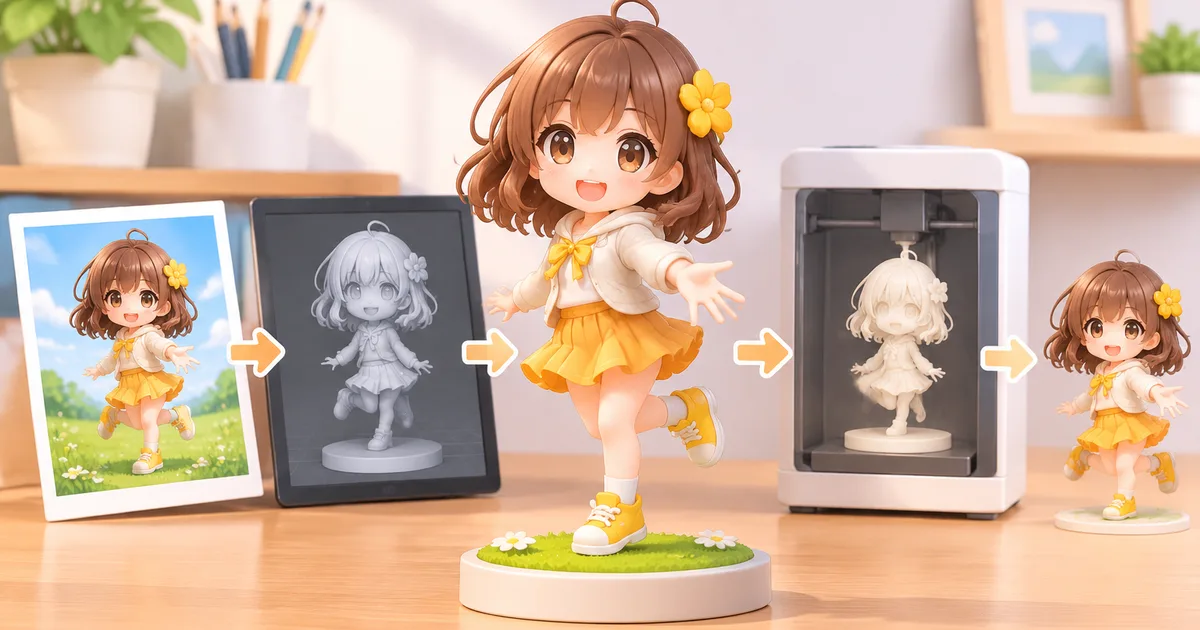
FigMee turns your uploaded photo into a custom 3D‑printed figure through a six‑step workflow that you control at each stage.
Step 1: Upload Your Photo
The process begins with a simple file upload on FigMee’s website or mobile app. You select a clear, well‑lit image where your face or the subject’s features are fully visible. The platform accepts common formats (JPEG, PNG) and limits file size to keep processing fast. After you confirm the upload, the system stores the image securely and prepares it for the AI model.
Step 2: AI‑Generated Preview (Free)
FigMee’s AI analyses the photo and creates a virtual 3D model that approximates the final figure. This preview is offered at no cost, allowing you to see pose, proportion, and style options before committing to a purchase. You can toggle between the three most popular styles—chibi (37% of users), realistic (35%), and anime (28%)—and decide whether to add a display base. As of today FigMee has produced 800 free previews, showing how many customers experiment with the service before ordering.
Step 3: Place Your Order
If the preview meets your expectations, you move to the order screen. Here you confirm the chosen style, material (e.g., PLA, resin), and any optional accessories such as a custom base or paint finish. You also provide shipping details and payment information. FigMee does not require a deposit; the full price is charged only after you approve the final 3D data in the next step.
Step 4: 3D Data Generation
Once payment is confirmed, FigMee’s pipeline converts the AI model into a high‑resolution mesh suitable for 3D printing. This stage includes automatic error checking—such as fixing non‑manifold edges—and may involve manual refinement by a technician if the source photo has challenging lighting or occlusions. The resulting file (usually STL or OBJ) is stored in the cloud, and you receive a notification that the data is ready for printing.
Step 5: 3D Printing and Finishing
The validated mesh is sent to a printer that matches the selected material. FigMee operates a network of printers that handle batch jobs to keep lead times reasonable. After the raw print emerges, technicians perform post‑processing: support removal, sanding, and, if you selected a painted finish, hand‑applied color layers. The most common choice among customers is a figure without a display base (58% of the 821 previews that included style data), but you can request a base at this stage if you prefer.
Step 6: Shipping
When the figure passes a final visual inspection, it is packaged in a protective box with foam inserts to prevent damage during transit. FigMee then ships the package using the carrier you selected during checkout. Tracking information is emailed automatically, and you can follow the delivery progress online. The entire workflow—from upload to shipping—typically spans several days, but exact timing varies with order volume and shipping destination.
What You Need to Do at Each Stage
- Upload: Choose a clear photo, follow format guidelines, and confirm the upload.
- Preview: Review AI‑generated models, switch styles, and decide on a base.
- Order: Select material, add optional finishes, and provide payment and address.
- Data Review: Approve the final 3D mesh (FigMee will notify you when it’s ready).
- Post‑Processing Choices: Indicate any extra finishing steps such as painting or a base.
- Receive: Track the shipment and sign for delivery.
Tips for a Successful Figure
- Lighting matters: Even, front‑facing light reduces shadows that can confuse the AI.
- Avoid accessories: Hats, glasses, or heavy makeup can obscure facial landmarks.
- High resolution: Images larger than 1 MP give the AI more detail to work with.
- Check the preview carefully: Small adjustments in pose or style can dramatically change the final look.
- Consider the material: PLA is lightweight and affordable; resin offers finer detail but is more fragile.
Limitations to Keep in Mind
- The AI cannot perfectly reproduce extremely complex hairstyles or intricate jewelry.
- Very low‑contrast images may produce a rougher mesh that requires more manual cleanup.
- FigMee does not guarantee that the final figure will be an exact replica of the photo; the service aims for a recognisable likeness within the chosen style.
FAQ
How long does the whole process take?
The timeline varies, but most orders move from upload to shipping within a week, depending on order volume and chosen shipping method.
Can I request a different pose after the preview?
The AI preview is limited to the pose detected in the original photo. To change pose you would need to upload a new image that captures the desired orientation.
Is there a way to see other customers’ figures before I order?
FigMee’s public gallery contains results from 265 customers who chose to share their figures. You can browse the gallery for inspiration, but each figure is unique to the uploaded photo.
Want to turn a photo into a figure?
Previews are free. Order only once you're happy with what you see.
Try it for free