
 Figurine
 Charm
 Magnet
 Relief
 Vent clip
 Tray
Can Figmee Turn Low‑Resolution or Dark Photos into Accurate 3D Figures?
Yes—Figmee can create a 3D figure from old or low‑quality photos, but image quality affects detail and may need extra work.
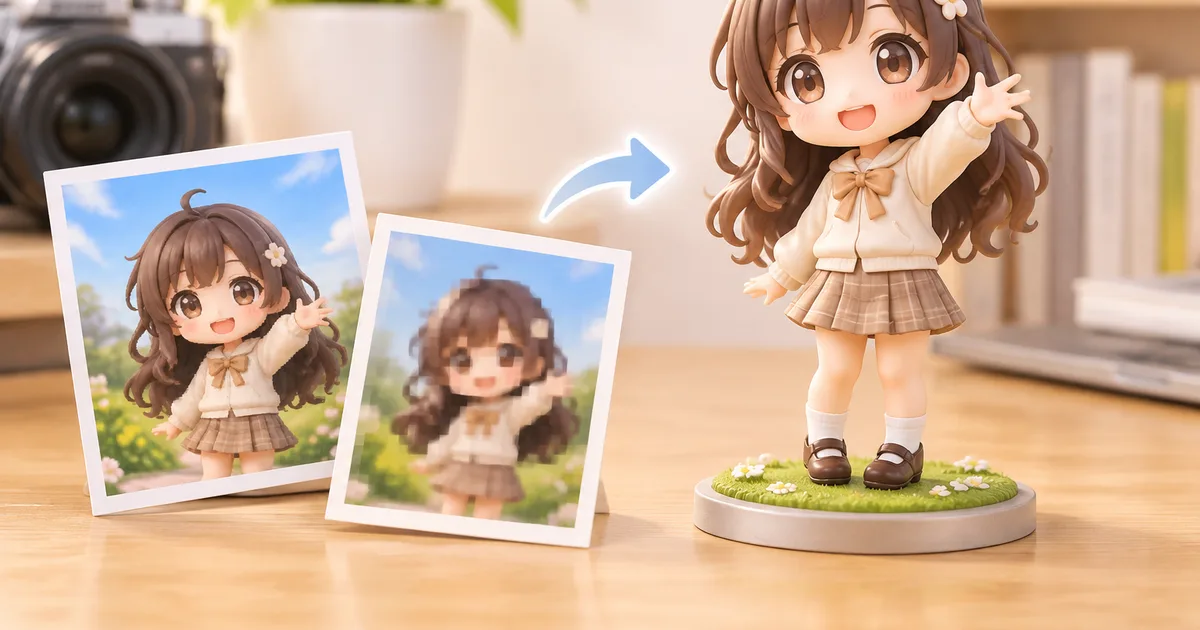
Yes, Figmee can produce a 3D‑printed figure from an old or low‑quality photo, though the final detail depends on the image’s resolution, blur, and lighting.
How Resolution Affects the Model
Figmee’s software analyses the pixel density of the uploaded picture to infer the shape of a face and body. A higher resolution provides more data points for the algorithm, resulting in smoother surfaces and finer facial features. When the photo is under 300 dpi or smaller than 800 × 800 pixels, the system must extrapolate missing information, which can lead to slightly softer edges or less defined hair strands. In practice, users with such images still receive a recognizable figure, but the level of realism—especially in the realistic style—will be lower than with a crisp portrait.
Dealing with Motion Blur
Blur smears the boundaries between features, making it hard for the software to locate eyes, nose, and mouth precisely. Figmee’s pipeline includes a basic de‑blur filter, but it cannot fully recover details that are not present in the original file. If the blur is moderate, the algorithm can still place the main facial landmarks correctly; heavy blur may cause the eyes to appear misplaced or the jawline to look rounded. When possible, users should try to supply a second photo taken from a slightly different angle; the system can combine information from both images to improve accuracy.
Managing Dark or Underexposed Images
Low light reduces contrast, making it difficult to separate foreground from background. Figmee automatically adjusts brightness and contrast during preprocessing, but extreme underexposure can hide important texture. If the subject’s face is barely visible, the resulting figure may have a generic expression and lack subtle shading. Users can help by increasing exposure in a photo‑editing tool before upload, or by providing a photo taken with a flash or in better lighting.
Practical Workarounds When a Reshoot Isn’t Possible
- Combine Multiple Shots: Upload two or three photos taken at different moments (e.g., one well‑lit, one sharp). Figmee can merge the clearer parts of each image to build a more complete model.
- Manual Touch‑Ups: After the free preview is generated, Figmee’s designers can manually refine the mesh based on the user’s notes. This service is optional and not guaranteed, but it can recover lost detail from a blurry or dark source.
- Choose a Simpler Style: The chibi style, which emphasizes proportion over fine detail, tolerates lower‑quality inputs better than the realistic style. According to Figmee’s own data, 40% of the 1,494 previews generated so far used the chibi style, and many of those came from older family photos.
- Use a Solid Background: A plain, contrasting background helps the algorithm separate the subject from the surroundings, reducing errors caused by low contrast.
What to Expect From the Final Figure
Even with a sub‑optimal photo, Figmee will produce a printable STL file that matches the overall pose and expression captured in the image. The figure’s surface may be smoother than the original photo suggests, and fine details like individual strands of hair may be simplified. Users should view the free preview before approving the final print; this step ensures that any major inaccuracies are caught early.
Figmee’s Current Capabilities (as of November 2026)
- Figmee has generated 1,494 figure previews in total, offering a broad sample of how the system handles varied image quality.
- Among the previews, 40% were created in the chibi style, which is particularly forgiving of low‑resolution or poorly lit photos.
Tips for Future Photo Preservation
- Scan printed photos at 600 dpi or higher before uploading.
- Use a flat, well‑lit surface and avoid flash reflections.
- Keep the subject’s face centered and avoid extreme angles.
- Save the digital file in a lossless format (PNG or TIFF) to preserve detail.
FAQ
Can I get a free preview before committing to a print?
Yes, Figmee offers a free digital preview of the 3D model so you can check how the figure looks before ordering.
What if the final figure still looks off after using a low‑quality photo?
You can request a manual refinement from Figmee’s designers, or try uploading an additional photo taken from a different angle or with better lighting to improve the result.
Want to turn a photo into a figure?
Previews are free. Order only once you're happy with what you see.
Try it for free