
 Figurine
 Charm
 Magnet
 Relief
 Vent clip
 Tray
Can you turn a cosplay photo into a custom 3D‑printed figure? Yes, with limits
Cosplay photos can be turned into 3D figures, but costume detail, accessories, and copyright rules affect the final result.
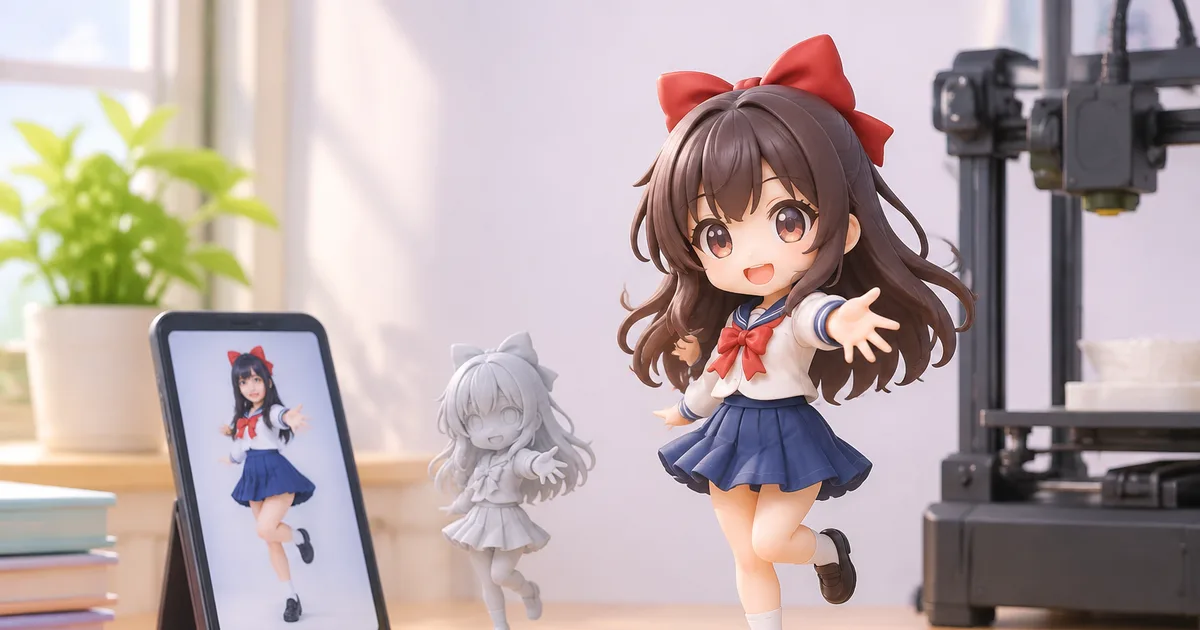
Yes—you can turn a cosplay photo into a custom 3D‑printed figure, though the fidelity of costumes, accessories, and wigs depends on preparation and legal considerations.
Understanding Figmee’s Reproduction Limits
Figmee builds a digital model from a single photograph and then prints it in a material that can capture fine details, but the process has practical boundaries. Large fabric folds, intricate lace, or transparent elements often lose definition because the scanner interprets surface geometry rather than texture. Small props such as swords, badges, or jewelry are reproduced best when they are clearly visible and contrast with the background; otherwise they may merge into the skin or be omitted.
Wigs present a special challenge. Figmee can capture the overall silhouette and major color blocks, but individual strands are not rendered. To improve wig fidelity, use a solid‑color wig without excessive shine and photograph it from the side so the outline is distinct. If the wig includes accessories (headbands, horns, etc.), position them so they do not overlap the face.
Preparing Your Photo for Best Results
The quality of the final figure is largely determined by the source image. Follow these practical steps before sending your photo to Figmee:
- Lighting – Use soft, even lighting that eliminates harsh shadows. Diffused daylight or a light box works well. Shadows can hide costume details and cause the software to misinterpret depth.
- Background – Choose a plain, matte background that contrasts with both skin and costume. A neutral gray or white works best; patterned or reflective backgrounds confuse edge detection.
- Resolution – Upload the highest resolution allowed by Figmee. A minimum of 300 dpi ensures that small accessories are captured.
- Pose – A three‑quarter view (slightly turned) reveals both front and side details. Keep the head upright and avoid extreme angles that hide the back of the costume.
- Visibility of Props – Hold weapons or accessories away from the body so the scanner can see their full shape. If a prop is too long, photograph it separately and attach the separate model later if Figmee offers a compositing service.
- Avoid Shiny Materials – Glossy fabrics or metallic surfaces reflect light and create hotspots. If your costume includes such elements, spray a light dusting of matte powder (test on a hidden area first) to reduce reflections.
By adhering to these guidelines you increase the chance that Figmee’s free preview will match your expectations, reducing the need for costly revisions.
Legal and Copyright Considerations
Cosplay figures often depict characters owned by studios, game developers, or manga publishers. While Figmee allows fans to create personal, non‑commercial replicas, there are important boundaries:
- Personal Use Only – Keep the finished figure for private enjoyment. Selling or distributing it without permission can infringe on the character’s intellectual property.
- Public Gallery – Figmee’s public gallery is visible to all users. If you upload a figure of a copyrighted character, you may be exposing yourself to takedown requests. Consider keeping the model private or anonymizing identifying details.
- Original Designs – If you design your own costume or modify a character substantially, you reduce the risk of infringement and often achieve a more accurate print because the software does not have to guess ambiguous details.
- Licensing – Some franchises offer official licensing programs for fan‑made merchandise. If you intend to sell the figure, check whether a license is required before proceeding.
Respecting these guidelines protects both you and Figmee from potential legal disputes.
Figmee’s Current Statistics (for context)
Figmee has generated 1,052 figure previews to date, showing the platform’s experience with a wide range of costumes and poses. Among those previews, the chibi style is the most popular, accounting for 38 % of user selections, which suggests many customers prefer a stylized, slightly exaggerated look that often hides minor costume imperfections.
Practical Tips for Post‑Processing
Even after a successful print, minor adjustments can improve the final display:
- Cleaning – Use a soft brush to remove any support material residue. If the figure is printed in resin, a brief dip in isopropyl alcohol helps.
- Painting – Figmee’s standard finish is a neutral base coat. Adding hand‑painted details can restore fabric texture or highlight metallic parts.
- Mounting – Although 63 % of previews are printed without a display base, adding a discreet pedestal can protect delicate poses and make the figure easier to showcase.
FAQ
How many photos do I need to submit?
One high‑quality, well‑lit photo is sufficient for Figmee’s standard preview; additional angles are optional but can help with complex accessories.
Will Figmee reproduce copyrighted characters?
Figmee can generate a preview of any character you upload, but the resulting figure is intended for personal, non‑commercial use only; selling it would violate most copyright holders’ rights.
Can I request a specific material for the final print?
Figmee offers a limited set of materials; you can select from the options presented during checkout, but the service does not guarantee specialty finishes.
How long does the printing process take?
The article does not provide specific timelines; Figmee’s website lists current production estimates for each material.
Want to turn a photo into a figure?
Previews are free. Order only once you're happy with what you see.
Try it for free