
 Figurine
 Charm
 Magnet
 Relief
 Vent clip
 Tray
You can create a 3D‑printed figure from a deceased family member’s photo
Yes—you can turn a loved one’s photo into a custom 3‑D figure with Figmee, following practical photo‑selection guidelines.
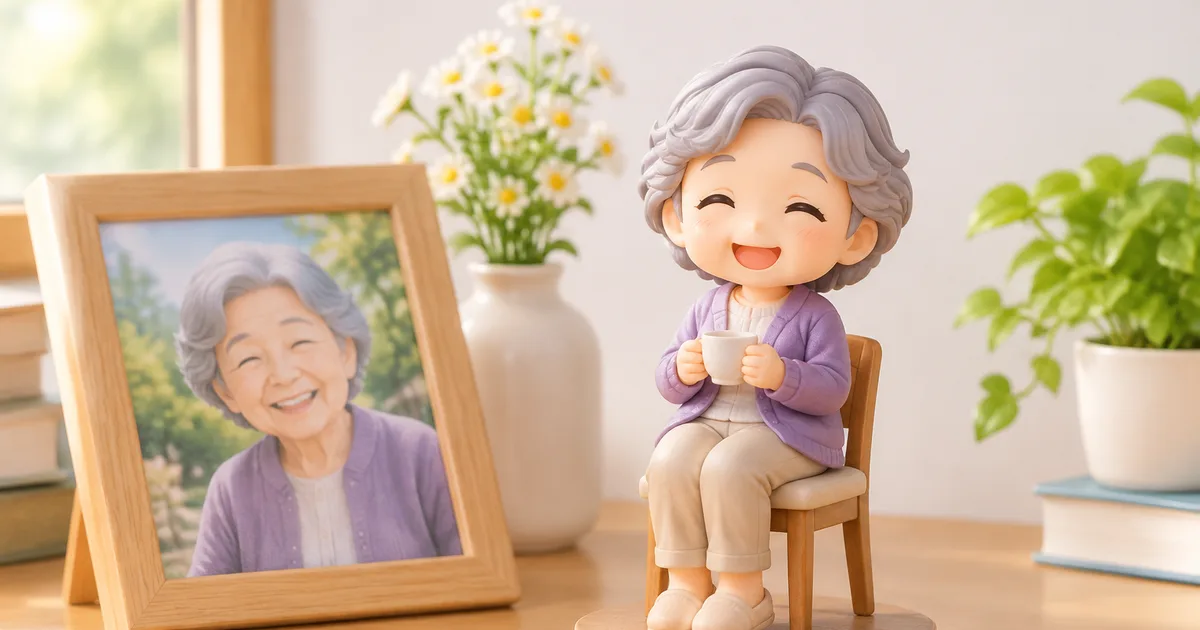
Yes—you can turn a loved one’s photo into a custom 3‑D figure with Figmee, following practical photo‑selection guidelines.
Choosing the Right Photo
Quality and Resolution
A clear, high‑resolution image is the foundation of a faithful figurine. Aim for at least 300 dpi if the photo is scanned, or use a digital file that was captured with good lighting and minimal compression. Blurry or pixelated areas become exaggerated when the model is rendered in three dimensions, leading to loss of detail.
Pose and Expression
Select a pose that the subject is naturally comfortable with. A straight‑on portrait works well for realistic or chibi styles, while a slight three‑quarter turn can add depth without requiring complex reconstruction. Expressions that are calm or gently smiling tend to translate into a figure that feels respectful and serene; extreme facial gestures may be harder for the algorithm to interpret accurately.
Background and Lighting
A plain background—ideally a solid, neutral color—helps the software isolate the subject. Strong back‑lighting creates silhouettes that lose interior detail, while harsh side lighting can cast deep shadows that the model may interpret as folds or creases. Soft, diffused lighting from the front reduces shadows and preserves facial features.
Preparing the Image for Figmee
Cropping and Centering
Crop the image so that the head and shoulders fill most of the frame, leaving a small margin around the edges. Center the face horizontally; this gives the rendering engine a balanced reference point for building the 3‑D mesh.
Removing Distractions
If the original photo contains objects, text, or other people, use a basic photo‑editing tool to erase or mask them. Even faint patterns on clothing can confuse the software, resulting in unintended textures on the final figure.
Deciding on Style and Base
Style Options
Figmee offers three main style families: chibi (a stylized, cute proportion), realistic, and anime. As of November 5 2026, 38 % of the 1,027 figure previews generated by Figmee’s users chose the chibi style, while realistic and anime styles each attracted roughly a third of the selections. Consider the personality of the person you are memorializing: a playful, youthful spirit may be best captured in chibi, whereas a more solemn remembrance might favor realistic.
Base Choices
Most customers (63 % of the 1,027 previews) opt for no display base, allowing the figure to stand alone on a shelf. A base can add stability and thematic context—such as a small wooden plank for a traditional feel—but it also changes the visual focus. Decide whether the figure will sit on a dedicated spot or be integrated into a larger arrangement of keepsakes.
Emotional Considerations
Placing the Figure at Home
Treat the figure as a quiet tribute rather than a conversation piece. A modest shelf in a living room, a bedside table, or a dedicated memorial nook can provide a gentle reminder without overwhelming the space. Position the figure where natural light does not create harsh glare, preserving the subtle details of the sculpted face.
Sharing with Others
Figmee allows users to publish their creations to a public gallery; 262 customers have done so. Sharing can be comforting for families who wish to celebrate the memory collectively, but it is entirely optional. If you choose to keep the figure private, remember that the preview image you receive can be saved for personal use without needing to upload it.
Practical Tips for a Smooth Process
- Test with a Free Preview – Figmee offers a free digital preview before any printing begins. Use this step to confirm that the pose, expression, and style match your expectations.
- Iterate if Needed – If the preview shows missing details, return to the source photo, improve lighting or cropping, and resubmit.
- Mind File Formats – Upload JPEG or PNG files; avoid GIFs or RAW files that the platform may not accept.
- Consider Future Additions – If you anticipate creating additional figures (e.g., a family set), keep the original high‑resolution photos organized for easy reuse.
- Respect Personal Boundaries – Discuss the idea with close family members before ordering, as memorial objects can evoke strong emotions.
FAQ
How many photos can I submit for one figure?
Figmee processes a single primary image per figure; however, you can upload additional reference photos during the preview stage to guide subtle details.
What if the preview does not look right?
Use Figmee’s free preview to identify issues, then adjust the source image—improve lighting, crop tighter, or remove background clutter—and resubmit for a new preview.
Can I choose the material of the figure?
Figmee currently offers standard resin for most orders; material options are listed on the order page, but they are not part of the free preview service.
Is it possible to add a name plate or inscription?
Custom text can be added as a separate accessory during the design phase, but it may affect the final cost and production time.
Want to turn a photo into a figure?
Previews are free. Order only once you're happy with what you see.
Try it for free